<?xml version="1.0" encoding="utf-8"?><feed xmlns="http://www.w3.org/2005/Atom" ><generator uri="https://jekyllrb.com/" version="3.10.0">Jekyll</generator><link href="https://cimos.github.io/feed.xml" rel="self" type="application/atom+xml" /><link href="https://cimos.github.io/" rel="alternate" type="text/html" /><updated>2026-10-03T15:05:23+00:00</updated><id>https://cimos.github.io/feed.xml</id><title type="html">CMOS Foundry</title><subtitle>Simon Maddison — UAS systems engineer. Embedded electronics, UAV avionics, PCB design (KiCad &amp; Altium), and mechanical keyboards.</subtitle><author><name>MadMan</name></author><entry><title type="html">etchy: A PCB Diff You Can Trust</title><link href="https://cimos.github.io/etchy-pcb-diff" rel="alternate" type="text/html" title="etchy: A PCB Diff You Can Trust" /><published>2026-10-03T00:00:00+00:00</published><updated>2026-10-03T00:00:00+00:00</updated><id>https://cimos.github.io/etchy-pcb-diff</id><content type="html" xml:base="https://cimos.github.io/etchy-pcb-diff"><![CDATA[<h2 id="table-of-contents">Table of contents</h2>
<ul>
  <li><a href="#overview">Overview</a></li>
  <li><a href="#why-trustworthy-is-the-whole-point">Why “trustworthy” is the whole point</a></li>
  <li><a href="#one-computation-three-outputs">One computation, three outputs</a></li>
  <li><a href="#ci-first-viewer-second">CI-first, viewer second</a></li>
  <li><a href="#try-it">Try it</a></li>
  <li><a href="#non-goals-and-whats-next">Non-goals and what’s next</a></li>
</ul>

<h2 id="overview">Overview</h2>

<p>You’ve spun rev B of a board, sent it to the fab, and somewhere between rev A and
rev B <em>something</em> changed on a copper layer. Which pad? How much? Did that
last-minute clearance nudge actually land, or did it quietly not? Staring at two
Gerber renders side by side is how mistakes get to production.</p>

<p><a href="https://github.com/Cimos/etchy"><strong>etchy</strong></a> points at two revisions of a board’s
fabrication output (Gerber, Excellon drill, pick-and-place) and shows <em>and
measures</em> exactly what changed. It’s the ground-up Rust successor to my Python
<a href="https://github.com/Cimos/Gerber-Diff-Tool">Gerber-Diff-Tool</a>, and as of v0.1 it
is public and usable. Dual-licensed MIT / Apache-2.0.</p>

<div class="language-plaintext highlighter-rouge"><div class="highlight"><pre class="highlight"><code>etchy old/ new/     # terminal summary; exit 0 = no diff, 1 = diff, 2 = error
</code></pre></div></div>

<h2 id="why-trustworthy-is-the-whole-point">Why “trustworthy” is the whole point</h2>

<p>A diff tool that occasionally misses a change is worse than no tool, because it
teaches you to trust it and then lets you down on the one board that mattered. So
the design is built around not lying to you:</p>

<ul>
  <li><strong>Same-board revisions only.</strong> Point it at two different boards and it fails
loud rather than emitting a confident, meaningless diff.</li>
  <li><strong>No silent misses.</strong> The engine is backed by a golden-image corpus plus
property and fuzz tests. The change either shows up or the run fails, never a
quiet wrong answer.</li>
</ul>

<p>The limits are written down too, in the repo’s
<a href="https://github.com/Cimos/etchy/blob/main/docs/TRUST.md">trust document</a>: what
etchy guarantees and what it deliberately doesn’t.</p>

<h2 id="one-computation-three-outputs">One computation, three outputs</h2>

<p>Everything comes from a single per-layer polygon boolean diff
(<code class="language-plaintext highlighter-rouge">added = B - A</code>, <code class="language-plaintext highlighter-rouge">removed = A - B</code>), computed once and presented three ways:</p>

<ol>
  <li>A resolution-independent <strong>SVG overlay</strong>: the classic red/green added/removed
view, but as vectors, so it stays crisp at any zoom. Also available as one
self-contained HTML report.</li>
  <li>A <strong>change heatmap</strong> for the question “where do I even look?” on boards where
the diff is a handful of pads in a sea of unchanged copper.</li>
  <li><strong>Magnitudes</strong>: changed area (mm²) and region count as JSON, so CI can gate on
<em>how much</em> changed, not just whether anything did.</li>
</ol>

<p>Moved, rotated, added and removed components show up as placement markers, and
schematic PDFs get a page-by-page pixel diff.</p>

<h2 id="ci-first-viewer-second">CI-first, viewer second</h2>

<p>etchy lives in a pipeline first and on your desktop second. It has proper exit
codes, per-layer thresholds, git refs (<code class="language-plaintext highlighter-rouge">etchy v1.0 HEAD fab/</code> diffs two commits
with no checkout) and JSON output. A GitHub Action posts a sticky per-layer table
on every pull request that touches Gerbers:</p>

<div class="language-yaml highlighter-rouge"><div class="highlight"><pre class="highlight"><code><span class="pi">-</span> <span class="na">uses</span><span class="pi">:</span> <span class="s">Cimos/etchy@v0.1.1</span>
  <span class="na">with</span><span class="pi">:</span>
    <span class="na">old</span><span class="pi">:</span> <span class="s">fab/rev-a</span>
    <span class="na">new</span><span class="pi">:</span> <span class="s">fab/rev-b</span>
    <span class="na">comment</span><span class="pi">:</span> <span class="no">true</span>
</code></pre></div></div>

<p>Gating is by magnitude and location, so silkscreen churn can be ignored while
copper changes over 0.5 mm² fail the build:</p>

<div class="language-plaintext highlighter-rouge"><div class="highlight"><pre class="highlight"><code>etchy old/ new/ --gate-layers copper --fail-on-area 0.5
</code></pre></div></div>

<p>It ships as small static binaries and an ~11 MB distroless container.</p>

<p>For poking around a diff by hand there’s a native <a href="https://github.com/emilk/egui">egui</a>
desktop viewer (Windows, macOS, Linux) with overlay, before/after, split and swipe
modes, plus a web build. It’s a separate binary that never gets compiled into the
headless builds, so CI stays lean.</p>

<h2 id="try-it">Try it</h2>

<p>The repo ships two revisions of a real board, my open
<a href="/madrp2040-anything-keypad">Mad_RP2040</a>, so there’s something to diff straight away:</p>

<div class="language-plaintext highlighter-rouge"><div class="highlight"><pre class="highlight"><code>etchy crates/etchy-gui/assets/demo/old crates/etchy-gui/assets/demo/new --html diff.html
# 10 of 13 layers changed
</code></pre></div></div>

<p>Binaries, installers and the container are on the
<a href="https://github.com/Cimos/etchy/releases">releases page</a>.</p>

<h2 id="non-goals-and-whats-next">Non-goals and what’s next</h2>

<p>etchy deliberately does <strong>not</strong> do net or connectivity diff, BOM diff or DRC. It
diffs fabrication output, trustworthily, and stops there. The other jobs have
other tools (<a href="/kitium">kitium</a> covers a chunk of the KiCad-side CI story).</p>

<p>Next up is reading KiCad <code class="language-plaintext highlighter-rouge">.kicad_pcb</code> files directly, so you can diff the design
and not just the fab output, with a list of changed objects alongside the layer
diff. Altium <code class="language-plaintext highlighter-rouge">.PcbDoc</code> follows.</p>

<p>-SM</p>]]></content><author><name>Simon Maddison</name></author><category term="pcb" /><category term="gerber" /><category term="rust" /><category term="diff" /><category term="ci-cd" /><category term="fabrication" /><summary type="html"><![CDATA[Table of contents Overview Why “trustworthy” is the whole point One computation, three outputs CI-first, viewer second Try it Non-goals and what’s next]]></summary><media:thumbnail xmlns:media="http://search.yahoo.com/mrss/" url="https://cimos.github.io/assets/images/og/etchy-pcb-diff.png" /><media:content medium="image" url="https://cimos.github.io/assets/images/og/etchy-pcb-diff.png" xmlns:media="http://search.yahoo.com/mrss/" /></entry><entry><title type="html">kicad-druid: Fab House Design Rules, Generated and Tested</title><link href="https://cimos.github.io/kicad-druid-design-rules" rel="alternate" type="text/html" title="kicad-druid: Fab House Design Rules, Generated and Tested" /><published>2026-10-03T00:00:00+00:00</published><updated>2026-10-03T00:00:00+00:00</updated><id>https://cimos.github.io/kicad-druid-design-rules</id><content type="html" xml:base="https://cimos.github.io/kicad-druid-design-rules"><![CDATA[<h2 id="table-of-contents">Table of contents</h2>
<ul>
  <li><a href="#overview">Overview</a></li>
  <li><a href="#what-changed-from-the-old-rules">What changed from the old rules</a></li>
  <li><a href="#one-source-of-truth-per-fab">One source of truth per fab</a></li>
  <li><a href="#generic-design-before-you-pick-a-fab">Generic: design before you pick a fab</a></li>
  <li><a href="#the-green-drc-that-checked-nothing">The green DRC that checked nothing</a></li>
  <li><a href="#using-it">Using it</a></li>
</ul>

<h2 id="overview">Overview</h2>

<p><a href="https://github.com/Cimos/kicad-druid"><strong>kicad-druid</strong></a> is a set of KiCad custom
design rules (<code class="language-plaintext highlighter-rouge">.kicad_dru</code>) that match what JLCPCB and PCBWay can actually make.
Drop the file for your order into your project and KiCad’s DRC flags anything the
fab would bounce, on your screen instead of in their review queue.</p>

<p>It replaces my earlier <a href="/kicad-custom-design-rules">KiCad Custom Design Rules</a>
repo, which is now in the archive. Same idea, rebuilt properly: the rules are
generated rather than hand-edited, every variant is checked by KiCad in CI, and
there is a new set of rules that works for either fab. MIT-licensed, works on
KiCad 8, 9 and 10.</p>

<h2 id="what-changed-from-the-old-rules">What changed from the old rules</h2>

<table>
  <thead>
    <tr>
      <th> </th>
      <th>Old repo</th>
      <th>kicad-druid</th>
    </tr>
  </thead>
  <tbody>
    <tr>
      <td>Rule files</td>
      <td>hand-edited</td>
      <td>generated</td>
    </tr>
    <tr>
      <td>Variants</td>
      <td>comment blocks</td>
      <td>one file per build</td>
    </tr>
    <tr>
      <td>Fabs</td>
      <td>JLCPCB, PCBWay</td>
      <td>+ Generic (both)</td>
    </tr>
    <tr>
      <td>CI</td>
      <td>lint</td>
      <td>lint + full DRC</td>
    </tr>
    <tr>
      <td>Silent failures</td>
      <td>possible</td>
      <td>sentinel rule</td>
    </tr>
  </tbody>
</table>

<h2 id="one-source-of-truth-per-fab">One source of truth per fab</h2>

<p>Each fab’s published capabilities live in one TOML file
(<code class="language-plaintext highlighter-rouge">capabilities/JLCPCB.toml</code>, <code class="language-plaintext highlighter-rouge">capabilities/PCBWay.toml</code>). A small Python script
generates every <code class="language-plaintext highlighter-rouge">.kicad_dru</code> from it, plus a side-by-side comparison table of the
two fabs. CI regenerates the files and fails if anyone hand-edits the output, so
the rules can’t drift away from the capability table they came from.</p>

<p>That also killed the old “uncomment the right block for your layer count” step,
which was the easiest way to get these files wrong. You now pick the whole file
that matches what you’re ordering:</p>

<table>
  <thead>
    <tr>
      <th>File</th>
      <th>Layers</th>
      <th>Copper</th>
    </tr>
  </thead>
  <tbody>
    <tr>
      <td><code class="language-plaintext highlighter-rouge">&lt;FAB&gt;.kicad_dru</code></td>
      <td>4 (default)</td>
      <td>1 oz</td>
    </tr>
    <tr>
      <td><code class="language-plaintext highlighter-rouge">&lt;FAB&gt;-2L-1oz.kicad_dru</code></td>
      <td>1–2</td>
      <td>1 oz</td>
    </tr>
    <tr>
      <td><code class="language-plaintext highlighter-rouge">&lt;FAB&gt;-4L-2oz.kicad_dru</code></td>
      <td>4</td>
      <td>2 oz</td>
    </tr>
    <tr>
      <td><code class="language-plaintext highlighter-rouge">&lt;FAB&gt;-6L-1oz.kicad_dru</code></td>
      <td>6</td>
      <td>1 oz</td>
    </tr>
  </tbody>
</table>

<p>PCBWay files also ship impedance net classes (50 Ω single-ended, 60–120 Ω
differential) as starting points for the fab’s default stackup.</p>

<h2 id="generic-design-before-you-pick-a-fab">Generic: design before you pick a fab</h2>

<p>Plenty of boards get designed before anyone has decided where they’ll be built.
The <code class="language-plaintext highlighter-rouge">Generic/</code> rules take the stricter of the two fabs for every limit: the larger
minimum, the smaller maximum, and any rule either fab needs. A board that passes
Generic passes at both. Once the fab is settled, switch to that fab’s file and the
limits relax. Generic is derived in code from the two fab files, so it follows any
capability update automatically.</p>

<h2 id="the-green-drc-that-checked-nothing">The green DRC that checked nothing</h2>

<p>This is the part I’m happiest with. If KiCad can’t compile a rules file (one
typo, one unknown layer name), it drops the rules, and <code class="language-plaintext highlighter-rouge">kicad-cli pcb drc</code>
reports a clean run with exit code 0. No warning, empty stderr. Your CI goes
green while not a single custom rule ran.</p>

<p>kicad-druid’s CI guards against that. It runs KiCad’s DRC on a paired test board
for every one of the twelve rule files, and before each run it appends a
<em>sentinel</em> rule that must always fire. If the sentinel isn’t in the report, the
file didn’t compile, and the job fails. It goes at the end of the file because
some errors drop only the rule they’re in and everything after it, while others
drop the whole file. Either way, the sentinel goes missing.</p>

<p>The linter also catches the quieter mistakes: lowercase item types like
<code class="language-plaintext highlighter-rouge">'track'</code> that KiCad silently never matches, and layer display names like
<code class="language-plaintext highlighter-rouge">F.Silkscreen</code> that stop resolving the moment a board is imported from Altium or
renamed.</p>

<h2 id="using-it">Using it</h2>

<ol>
  <li>Copy the <code class="language-plaintext highlighter-rouge">.kicad_dru</code> matching your order from <code class="language-plaintext highlighter-rouge">JLCPCB/</code>, <code class="language-plaintext highlighter-rouge">PCBWay/</code> or <code class="language-plaintext highlighter-rouge">Generic/</code> into your project folder.</li>
  <li>Rename it to match the project: <code class="language-plaintext highlighter-rouge">your-project.kicad_dru</code>.</li>
  <li>Run DRC (F8). Check <code class="language-plaintext highlighter-rouge">Board Setup &gt; Design Rules &gt; Custom Rules</code> once for errors, since KiCad won’t tell you otherwise.</li>
</ol>

<p>Releases and the full rule comparison are on
<a href="https://github.com/Cimos/kicad-druid">GitHub</a>. It started as a fork of
<a href="https://github.com/labtroll/KiCad-DesignRules">labtroll/KiCad-DesignRules</a> by
Morten Hattesen, with that history kept.</p>

<p>-SM</p>]]></content><author><name>Simon Maddison</name></author><category term="kicad" /><category term="kicad-dru" /><category term="design-rules" /><category term="drc" /><category term="jlcpcb" /><category term="pcbway" /><category term="ci-cd" /><category term="pcb" /><summary type="html"><![CDATA[Table of contents Overview What changed from the old rules One source of truth per fab Generic: design before you pick a fab The green DRC that checked nothing Using it]]></summary><media:thumbnail xmlns:media="http://search.yahoo.com/mrss/" url="https://cimos.github.io/assets/images/og/kicad-druid-design-rules.png" /><media:content medium="image" url="https://cimos.github.io/assets/images/og/kicad-druid-design-rules.png" xmlns:media="http://search.yahoo.com/mrss/" /></entry><entry><title type="html">eV+ in VS Code: Language Support for Omron Robot Programs</title><link href="https://cimos.github.io/vscode-evplus-extension" rel="alternate" type="text/html" title="eV+ in VS Code: Language Support for Omron Robot Programs" /><published>2026-10-03T00:00:00+00:00</published><updated>2026-10-03T00:00:00+00:00</updated><id>https://cimos.github.io/vscode-evplus-extension</id><content type="html" xml:base="https://cimos.github.io/vscode-evplus-extension"><![CDATA[<h2 id="table-of-contents">Table of contents</h2>
<ul>
  <li><a href="#overview">Overview</a></li>
  <li><a href="#why-bother">Why bother</a></li>
  <li><a href="#what-you-get">What you get</a></li>
  <li><a href="#built-from-the-manual">Built from the manual</a></li>
  <li><a href="#trying-it">Trying it</a></li>
</ul>

<h2 id="overview">Overview</h2>

<p>Omron Adept robots are programmed in <strong>eV+</strong> (and its older sibling V+), a
language that dates back decades and shows it. The official editor does the job,
but it’s a long way from a modern code editor.
<a href="https://github.com/Cimos/vscode-evplus"><strong>vscode-evplus</strong></a> brings eV+ / V+
programs (<code class="language-plaintext highlighter-rouge">.pg</code>, <code class="language-plaintext highlighter-rouge">.v2</code>) into VS Code: highlighting, hover help, completion,
diagnostics and navigation. MIT-licensed.</p>

<h2 id="why-bother">Why bother</h2>

<p>eV+ has a few traps that bite anyone coming from another language. The big one:
everything after a <code class="language-plaintext highlighter-rouge">;</code> is a comment. So this line</p>

<div class="language-plaintext highlighter-rouge"><div class="highlight"><pre class="highlight"><code>a = 1 ; b = 2
</code></pre></div></div>

<p>only assigns <code class="language-plaintext highlighter-rouge">a</code>. Nothing warns you, the robot just doesn’t do the second half.
Add a large program split across many <code class="language-plaintext highlighter-rouge">.PROGRAM</code> blocks, <code class="language-plaintext highlighter-rouge">GOTO</code> labels, and a
reference manual you have to keep open in another window, and small mistakes are
easy to make and slow to find. An editor that knows the language catches most of
them before the program ever reaches the controller.</p>

<h2 id="what-you-get">What you get</h2>

<ul>
  <li><strong>Highlighting</strong> for control flow, instructions, functions, system switches and
parameters, radix numbers (<code class="language-plaintext highlighter-rouge">^HFF</code>, <code class="language-plaintext highlighter-rouge">^B1010</code>), precision points (<code class="language-plaintext highlighter-rouge">#pick</code>), string
variables (<code class="language-plaintext highlighter-rouge">$name</code>), labels and <code class="language-plaintext highlighter-rouge">.PROGRAM</code> / <code class="language-plaintext highlighter-rouge">.END</code> blocks, with folding.</li>
  <li><strong>Hover</strong> shows the manual’s syntax line for the keyword under the cursor.</li>
  <li><strong>Completion</strong> for 260+ keywords with their type and syntax, and <strong>signature
help</strong> that tracks which parameter you’re on.</li>
  <li><strong>Diagnostics</strong> for code hiding after a <code class="language-plaintext highlighter-rouge">;</code>, <code class="language-plaintext highlighter-rouge">GOTO</code> targets that don’t exist,
and unpaired <code class="language-plaintext highlighter-rouge">.PROGRAM</code> / <code class="language-plaintext highlighter-rouge">.END</code>.</li>
  <li><strong>Navigation</strong>: every program in the Outline panel, go-to-definition and find
references across the workspace, and Ctrl+T to jump to any program by name.</li>
  <li>Snippets and auto-indent for the usual blocks (IF, WHILE, DO/UNTIL, FOR, CASE).</li>
</ul>

<h2 id="built-from-the-manual">Built from the manual</h2>

<p>The keyword data isn’t typed in by hand. A script reads an extraction of the eV+
Language Reference Guide and generates both the keyword list (name, type and
syntax for each entry) and the keyword patterns in the grammar. When the manual
changes, the extension is regenerated rather than patched. Only the syntax lines
are committed. If you own the manual you can regenerate locally with the fuller
descriptions for richer hover text.</p>

<p>The grammar is covered by tokenisation snapshot tests, so a change that breaks
highlighting on an existing construct fails the test run.</p>

<h2 id="trying-it">Trying it</h2>

<p>It isn’t on the marketplace yet. Build it from source:</p>

<div class="language-plaintext highlighter-rouge"><div class="highlight"><pre class="highlight"><code>npm install
npm run package
./install.sh
</code></pre></div></div>

<p><code class="language-plaintext highlighter-rouge">install.sh</code> installs the extension on both the WSL and Windows sides of VS Code.
Reload, open a <code class="language-plaintext highlighter-rouge">.pg</code> file, and go.</p>

<p>Source is on <a href="https://github.com/Cimos/vscode-evplus">GitHub</a>.</p>

<p>-SM</p>]]></content><author><name>Simon Maddison</name></author><category term="vscode" /><category term="omron" /><category term="robotics" /><category term="automation" /><category term="ev-plus" /><category term="extension" /><summary type="html"><![CDATA[Table of contents Overview Why bother What you get Built from the manual Trying it]]></summary><media:thumbnail xmlns:media="http://search.yahoo.com/mrss/" url="https://cimos.github.io/assets/images/og/vscode-evplus-extension.png" /><media:content medium="image" url="https://cimos.github.io/assets/images/og/vscode-evplus-extension.png" xmlns:media="http://search.yahoo.com/mrss/" /></entry><entry><title type="html">Altium → DigiKey: BOM to Cart in One Command</title><link href="https://cimos.github.io/altium-push-to-digikey" rel="alternate" type="text/html" title="Altium → DigiKey: BOM to Cart in One Command" /><published>2026-07-01T00:00:00+00:00</published><updated>2026-07-01T00:00:00+00:00</updated><id>https://cimos.github.io/altium-push-to-digikey</id><content type="html" xml:base="https://cimos.github.io/altium-push-to-digikey"><![CDATA[<h2 id="table-of-contents">Table of contents</h2>
<ul>
  <li><a href="#overview">Overview</a></li>
  <li><a href="#the-dumb-tedious-step">The dumb tedious step</a></li>
  <li><a href="#the-trick-no-auth-at-all">The trick: no auth at all</a></li>
  <li><a href="#running-it">Running it</a></li>
  <li><a href="#know-what-youre-trading">Know what you’re trading</a></li>
</ul>

<h2 id="overview">Overview</h2>

<p><a href="https://github.com/Cimos/Altium-Push-to-DigiKey">Cimos/Altium-Push-to-DigiKey</a> takes an Altium BOM and turns it into a DigiKey shopping list you can open and buy. One command. MIT-licensed.</p>

<h2 id="the-dumb-tedious-step">The dumb tedious step</h2>

<p>Between “the design is done” and “the parts are on order” sits a chore nobody enjoys: copying manufacturer part numbers out of a BOM and pasting them into a distributor cart, line by line, minding quantities and skipping the DNPs. It’s ten boring minutes that’s easy to get subtly wrong, and you do it every spin.</p>

<p>This automates exactly that step and nothing more. It reads the BOM Altium already emits — either the raw CSV from a BOM Output Job or the normalised JSON from a review-pack pipeline — parses it tolerantly for part number, quantity and designator, skips <code class="language-plaintext highlighter-rouge">DNP</code> rows and anything with an empty MPN or zero quantity, and hands you back a link.</p>

<h2 id="the-trick-no-auth-at-all">The trick: no auth at all</h2>

<p>The neat part is there’s nothing to set up. No API key, no OAuth dance. It POSTs to DigiKey’s anonymous <code class="language-plaintext highlighter-rouge">mylists/api/thirdparty</code> endpoint — the same one Digi-Key’s own official KiCad plugin uses — and gets back a short URL like <code class="language-plaintext highlighter-rouge">digikey.com/short/&lt;code&gt;</code>. You open that in a browser and the list drops into whatever account you’re logged into. Anonymous on the way out, account-tied the moment you click. An authenticated direct-to-account mode over OAuth2 is on the list, but for the common case the no-auth path is the whole appeal.</p>

<h2 id="running-it">Running it</h2>

<p>Python 3.8+, installed straight from the repo:</p>

<div class="language-bash highlighter-rouge"><div class="highlight"><pre class="highlight"><code>pip <span class="nb">install </span>git+https://github.com/Cimos/Altium-Push-to-DigiKey.git
</code></pre></div></div>

<p>Then point it at a BOM. <code class="language-plaintext highlighter-rouge">--dry-run</code> parses and reports without sending; <code class="language-plaintext highlighter-rouge">--open</code> launches the browser for you; <code class="language-plaintext highlighter-rouge">--tags</code> labels the list.</p>

<h2 id="know-what-youre-trading">Know what you’re trading</h2>

<p>Convenience like this always costs something, so here’s the bill, stated plainly:</p>

<ul>
  <li>The short URL is <strong>link-shareable until you claim it</strong> — anyone with the link can grab the list, so treat it like a secret.</li>
  <li>The endpoint isn’t formally documented as a public API, and there’s no per-user authentication on the POST. It works because the official plugin uses it, not because DigiKey promised it would.</li>
  <li>There’s no compliance filtering. NDAA and any regulatory concerns are yours to handle upstream, before the parts ever reach this script.</li>
</ul>

<p>None of that is a dealbreaker for ordering your own prototypes. It’s worth knowing before you wire it into anything that matters.</p>

<p>-SM</p>]]></content><author><name>Simon Maddison</name></author><category term="altium" /><category term="digikey" /><category term="bom" /><category term="python" /><category term="procurement" /><category term="automation" /><summary type="html"><![CDATA[Table of contents Overview The dumb tedious step The trick: no auth at all Running it Know what you’re trading]]></summary><media:thumbnail xmlns:media="http://search.yahoo.com/mrss/" url="https://cimos.github.io/assets/images/og/altium-push-to-digikey.png" /><media:content medium="image" url="https://cimos.github.io/assets/images/og/altium-push-to-digikey.png" xmlns:media="http://search.yahoo.com/mrss/" /></entry><entry><title type="html">An Interactive HTML BOM for Altium Designer</title><link href="https://cimos.github.io/ibom-for-altium" rel="alternate" type="text/html" title="An Interactive HTML BOM for Altium Designer" /><published>2026-07-01T00:00:00+00:00</published><updated>2026-07-01T00:00:00+00:00</updated><id>https://cimos.github.io/ibom-for-altium</id><content type="html" xml:base="https://cimos.github.io/ibom-for-altium"><![CDATA[<h2 id="table-of-contents">Table of contents</h2>
<ul>
  <li><a href="#overview">Overview</a></li>
  <li><a href="#why-hand-assembly-needs-this">Why hand-assembly needs this</a></li>
  <li><a href="#standing-on-the-openscopeprojects-shoulders">Standing on the OpenScopeProject’s shoulders</a></li>
  <li><a href="#getting-it-out-of-altium">Getting it out of Altium</a></li>
</ul>

<h2 id="overview">Overview</h2>

<p><a href="https://github.com/Cimos/interactivehtmlbom4altium2">Cimos/interactivehtmlbom4altium2</a> generates an interactive HTML BOM from an Altium Designer project — a single self-contained page where you can search a part and have its footprint light up on the board, and click a footprint to jump to its BOM row. MIT-licensed.</p>

<h2 id="why-hand-assembly-needs-this">Why hand-assembly needs this</h2>

<p>If you’ve ever hand-populated a dense board, you know the loop: find the next line on the BOM, find that reference designator on the board, place the part, repeat two hundred times. On paper that means squinting between a printout and the PCB, losing your place, and occasionally soldering a 4.7k where the 47k goes.</p>

<p>An interactive BOM collapses that. Search or step through the list, the matching footprint highlights on a rendered board, and you never lose which parts are already down. For the KiCad crowd this has been a solved problem for years. Altium users have mostly been left doing it the paper way.</p>

<h2 id="standing-on-the-openscopeprojects-shoulders">Standing on the OpenScopeProject’s shoulders</h2>

<p>I didn’t invent the good part here. The <a href="https://github.com/openscopeproject/InteractiveHtmlBom">InteractiveHtmlBom</a> project by the OpenScopeProject is the tool everyone means when they say “iBOM,” and its output format is the thing worth being compatible with. What was missing was the front half for Altium — the bit that reads the design and produces data in that shape.</p>

<p>So this is that half. It pulls PCB and schematic data through Altium’s Pascal scripting API, renders silkscreen, pads, text and drawings, and writes out HTML, a JS bundle, and JSON that matches the InteractiveHtmlBom schema — so it slots straight into the ecosystem that already exists. Optional tracks, zones and a netlist get you live net highlighting on top.</p>

<p>It’s quick enough to live in your workflow: roughly five seconds for a 200-component board, around fifty for a genuinely dense 2000-part one.</p>

<h2 id="getting-it-out-of-altium">Getting it out of Altium</h2>

<p>Two ways in, depending on how you work. Run it as a script from the PCB layout and a configuration GUI comes up — good for one-offs. Or add the <code class="language-plaintext highlighter-rouge">.pas</code> to an OutJob as a Report Output, and the interactive BOM gets generated as part of your normal output run, right next to the gerbers and the assembly drawings, every time.</p>

<p>-SM</p>]]></content><author><name>Simon Maddison</name></author><category term="altium" /><category term="bom" /><category term="interactive-html-bom" /><category term="pcb" /><category term="assembly" /><category term="pascal" /><summary type="html"><![CDATA[Table of contents Overview Why hand-assembly needs this Standing on the OpenScopeProject’s shoulders Getting it out of Altium]]></summary><media:thumbnail xmlns:media="http://search.yahoo.com/mrss/" url="https://cimos.github.io/assets/images/og/ibom-for-altium.png" /><media:content medium="image" url="https://cimos.github.io/assets/images/og/ibom-for-altium.png" xmlns:media="http://search.yahoo.com/mrss/" /></entry><entry><title type="html">kibot-config: One Push, a Full Fabrication Datapack</title><link href="https://cimos.github.io/kibot-config" rel="alternate" type="text/html" title="kibot-config: One Push, a Full Fabrication Datapack" /><published>2026-07-01T00:00:00+00:00</published><updated>2026-07-01T00:00:00+00:00</updated><id>https://cimos.github.io/kibot-config</id><content type="html" xml:base="https://cimos.github.io/kibot-config"><![CDATA[<h2 id="table-of-contents">Table of contents</h2>
<ul>
  <li><a href="#overview">Overview</a></li>
  <li><a href="#a-board-isnt-done-when-the-layout-is">A board isn’t done when the layout is</a></li>
  <li><a href="#the-jobs">The jobs</a></li>
  <li><a href="#what-it-expects-from-your-repo">What it expects from your repo</a></li>
  <li><a href="#why-its-its-own-repo">Why it’s its own repo</a></li>
</ul>

<h2 id="overview">Overview</h2>

<p><a href="https://github.com/Cimos/kibot-config">Cimos/kibot-config</a> is a GitHub Action and a small library of KiBot configs that turn a KiCad project into a complete fabrication datapack — drawings, gerbers, BOM, pick-and-place, 3D STEP, Blender renders, panels, visual diffs — on every push.</p>

<h2 id="a-board-isnt-done-when-the-layout-is">A board isn’t done when the layout is</h2>

<p>Finishing the layout feels like the end. It isn’t. Then you export gerbers, generate the drill files, produce a BOM in whatever format the assembler wants this week, a pick-and-place with the right origin, a STEP for the mechanical team, a render for the pull request, and a panel drawing for the fab. Do that by hand, from menus, every time you change a resistor, and you’ll eventually ship the <em>old</em> gerbers by accident.</p>

<p>The fix is the same one CI applies to software: never generate release artefacts by hand. Let a machine rebuild the whole datapack from source on every push, deterministically, so what you hand to the fab always matches the commit.</p>

<h2 id="the-jobs">The jobs</h2>

<p>Each config is a self-contained stage you can run on its own:</p>

<ul>
  <li><strong><code class="language-plaintext highlighter-rouge">build-pcb</code></strong> — schematics, PCB PDFs, gerbers, BOMs, pick-and-place, KiCost data, stencils</li>
  <li><strong><code class="language-plaintext highlighter-rouge">build-3d_model</code></strong> — STEP exports, simple and full</li>
  <li><strong><code class="language-plaintext highlighter-rouge">build-2d_images</code></strong> — four Blender renders (top/bottom × angled/straight)</li>
  <li><strong><code class="language-plaintext highlighter-rouge">build-video</code></strong> — a rotating-board frame sequence</li>
  <li><strong><code class="language-plaintext highlighter-rouge">build-diff</code></strong> — KiRi and git-based visual diffs of the PCB and schematic</li>
  <li><strong><code class="language-plaintext highlighter-rouge">build-panel</code></strong> — drawings for panelized boards</li>
</ul>

<h2 id="what-it-expects-from-your-repo">What it expects from your repo</h2>

<p>Almost nothing, on purpose. It auto-detects a single top-level <code class="language-plaintext highlighter-rouge">*.kicad_pro</code>, reads an <code class="language-plaintext highlighter-rouge">options.yaml</code> for preflight overrides, filters and variants, and an optional <code class="language-plaintext highlighter-rouge">panelization.yaml</code> if you’re panelizing. Add a workflow that checks out your project and this repo, then names the config you want:</p>

<div class="language-yaml highlighter-rouge"><div class="highlight"><pre class="highlight"><code><span class="pi">-</span> <span class="na">uses</span><span class="pi">:</span> <span class="s">Cimos/kibot-config@main</span>
  <span class="na">with</span><span class="pi">:</span>
    <span class="na">config</span><span class="pi">:</span> <span class="s">build-pcb-kibot.yaml</span>
</code></pre></div></div>

<h2 id="why-its-its-own-repo">Why it’s its own repo</h2>

<p>This started life inside <a href="/madrp2040-anything-keypad">Mad_RP2040</a> as that board’s pipeline. It was obviously not board-specific — nothing in “export the gerbers” cares which board it is — so I pulled it out so any project could reuse it without copy-pasting a <code class="language-plaintext highlighter-rouge">.github</code> folder around. It’s BSD-3-Clause for the same reason: I’d rather people lift these into their own boards without having to think about the licence.</p>

<p>-SM</p>]]></content><author><name>Simon Maddison</name></author><category term="kicad" /><category term="kibot" /><category term="github-actions" /><category term="gerbers" /><category term="bom" /><category term="blender" /><category term="panelization" /><category term="ci-cd" /><summary type="html"><![CDATA[Table of contents Overview A board isn’t done when the layout is The jobs What it expects from your repo Why it’s its own repo]]></summary><media:thumbnail xmlns:media="http://search.yahoo.com/mrss/" url="https://cimos.github.io/assets/images/og/kibot-config.png" /><media:content medium="image" url="https://cimos.github.io/assets/images/og/kibot-config.png" xmlns:media="http://search.yahoo.com/mrss/" /></entry><entry><title type="html">KiCad Design Rules That Match Your Fab House</title><link href="https://cimos.github.io/kicad-custom-design-rules" rel="alternate" type="text/html" title="KiCad Design Rules That Match Your Fab House" /><published>2026-07-01T00:00:00+00:00</published><updated>2026-07-01T00:00:00+00:00</updated><id>https://cimos.github.io/kicad-custom-design-rules</id><content type="html" xml:base="https://cimos.github.io/kicad-custom-design-rules"><![CDATA[<blockquote>
  <p><strong>Superseded:</strong> these rules have been rebuilt as <a href="/kicad-druid-design-rules">kicad-druid</a>, with generated rule files, a Generic set for either fab, and full KiCad DRC in CI. Use that one for new projects.</p>
</blockquote>

<h2 id="table-of-contents">Table of contents</h2>
<ul>
  <li><a href="#overview">Overview</a></li>
  <li><a href="#the-check-kicad-doesnt-do">The check KiCad doesn’t do</a></li>
  <li><a href="#rules-that-cant-quietly-rot">Rules that can’t quietly rot</a></li>
  <li><a href="#using-it">Using it</a></li>
  <li><a href="#the-one-gotcha">The one gotcha</a></li>
</ul>

<h2 id="overview">Overview</h2>

<p>KiCad’s DRC will happily tell you your board is perfect. Your fab house may disagree. <a href="https://github.com/Cimos/KiCad-CustomDesignRules">Cimos/KiCad-CustomDesignRules</a> is a set of <code class="language-plaintext highlighter-rouge">.kicad_dru</code> files that teach KiCad what a given manufacturer will actually accept — right now, JLCPCB and PCBWay. MIT-licensed, and by some distance the most-used thing I’ve put on GitHub, which tells you how common the problem is.</p>

<h2 id="the-check-kicad-doesnt-do">The check KiCad doesn’t do</h2>

<p>Default DRC checks that your board is internally consistent: nets don’t short, clearances match the netclasses <em>you</em> set, courtyards don’t overlap. What it has no opinion on is whether the 0.1 mm trace you just routed is below your fab’s floor on their cheap process, or whether your annular ring survives their drill tolerance.</p>

<p>Every fab publishes a capability table. Almost nobody transcribes it into KiCad’s custom-rules syntax, because the syntax is fiddly and the table is long. So the board passes DRC, gets to the fab, fails their review, and bounces back with a note about minimum annular ring — usually after you’ve already paid and started waiting.</p>

<p>These files are that transcription, done once and checked, so the failure happens on your screen instead of in their inbox.</p>

<h2 id="rules-that-cant-quietly-rot">Rules that can’t quietly rot</h2>

<p>The failure mode for a project like this is subtle: KiCad changes a token, a rule silently stops matching anything, and the file still “passes” because it’s now checking nothing. Green tick, zero coverage.</p>

<p>So every fab folder ships its <code class="language-plaintext highlighter-rouge">.kicad_dru</code> next to a paired test board — a real <code class="language-plaintext highlighter-rouge">.kicad_pcb</code> with footprints placed to trip each rule on purpose. If a rule stops biting, the test board stops failing where it should, and that’s caught. On top of that there’s a Python linter for syntax and a headless KiCad 8+ command-line DRC pass, so the whole set is machine-verified rather than eyeballed. Authored against KiCad 8 syntax, forward-compatible with 9 and 10.</p>

<h2 id="using-it">Using it</h2>

<p>Copy the relevant file into your project, rename it to match, then <em>Board Setup → Design Rules → Custom Rules</em>, and run the checker with <strong>F8</strong>. That’s the whole workflow.</p>

<h2 id="the-one-gotcha">The one gotcha</h2>

<p>A lot of rules ship with alternates commented out — different values for different layer counts or copper weights. Those aren’t automatic. Pick the variant that matches the board you’re actually ordering, and read the comments before you trust the result. A green tick against the wrong copper weight is just a different way to be wrong.</p>

<p>Found a capability the rules get wrong, or want a fab I haven’t added? <a href="https://github.com/Cimos/KiCad-CustomDesignRules/issues">Open an issue</a> — a fab’s spec sheet plus a failing example is exactly what makes these better.</p>

<p>-SM</p>]]></content><author><name>Simon Maddison</name></author><category term="kicad" /><category term="kicad-dru" /><category term="design-rules" /><category term="drc" /><category term="jlcpcb" /><category term="pcbway" /><category term="pcb" /><category term="eda" /><summary type="html"><![CDATA[Superseded: these rules have been rebuilt as kicad-druid, with generated rule files, a Generic set for either fab, and full KiCad DRC in CI. Use that one for new projects.]]></summary><media:thumbnail xmlns:media="http://search.yahoo.com/mrss/" url="https://cimos.github.io/assets/images/og/kicad-custom-design-rules.png" /><media:content medium="image" url="https://cimos.github.io/assets/images/og/kicad-custom-design-rules.png" xmlns:media="http://search.yahoo.com/mrss/" /></entry><entry><title type="html">kitium: An Altium-to-KiCad Validation Gate for CI</title><link href="https://cimos.github.io/kitium" rel="alternate" type="text/html" title="kitium: An Altium-to-KiCad Validation Gate for CI" /><published>2026-07-01T00:00:00+00:00</published><updated>2026-07-01T00:00:00+00:00</updated><id>https://cimos.github.io/kitium</id><content type="html" xml:base="https://cimos.github.io/kitium"><![CDATA[<h2 id="table-of-contents">Table of contents</h2>
<ul>
  <li><a href="#overview">Overview</a></li>
  <li><a href="#dont-migrate-re-derive">Don’t migrate, re-derive</a></li>
  <li><a href="#what-runs-on-every-pr">What runs on every PR</a></li>
  <li><a href="#what-ill-say-works-and-what-i-wont">What I’ll say works, and what I won’t</a></li>
  <li><a href="#dropping-it-into-a-repo">Dropping it into a repo</a></li>
</ul>

<h2 id="overview">Overview</h2>

<p>Plenty of hardware teams live in Altium and aren’t going to stop. But KiCad’s toolchain is free, headless and scriptable in a way Altium’s isn’t, which makes it a genuinely good <em>reviewer</em> even when it’s a bad fit as the <em>editor</em>. <a href="https://github.com/Cimos/kitium">Cimos/kitium</a> sits in that gap: a CI/CD gate that converts an Altium project to KiCad and validates it on every pull request. MIT-licensed.</p>

<p>The name is <strong>Ki</strong>(Cad) welded to (Al)<strong>tium</strong>, with a nod to Zeno of Citium — founder of Stoicism, which is about the right temperament for something that reviews your board dispassionately and has no feelings about your routing.</p>

<h2 id="dont-migrate-re-derive">Don’t migrate, re-derive</h2>

<p>The instinct when you want KiCad’s tooling is to migrate the project. That’s a one-way door and a merge-conflict nightmare on a board that’s still changing.</p>

<p>kitium takes the other path: Altium stays the single source of truth, and the KiCad files are re-derived from it on every run and then thrown away. Nothing generated is committed back. The KiCad project is a disposable artefact whose only job is to be inspected — so there’s never a second copy to keep in sync, and never a question about which one is real.</p>

<h2 id="what-runs-on-every-pr">What runs on every PR</h2>

<ol>
  <li>Find the Altium project — <code class="language-plaintext highlighter-rouge">.PrjPcb</code> / <code class="language-plaintext highlighter-rouge">.PcbDoc</code>, including multi-board setups.</li>
  <li>Convert each board headlessly with <code class="language-plaintext highlighter-rouge">kicad-cli pcb import --format altium</code>.</li>
  <li>Push it through KiBot: DRC, gerbers, 2D and 3D renders, visual comparisons.</li>
  <li>Cross-check the board’s BOM against an exported Altium CSV.</li>
  <li>Post the lot back onto the pull request — renders, diffs, downloadable artefacts.</li>
</ol>

<h2 id="what-ill-say-works-and-what-i-wont">What I’ll say works, and what I won’t</h2>

<p>I’d rather scope this honestly than let a green badge imply more than it checks:</p>

<ul>
  <li><strong>Solid.</strong> PCB conversion, DRC, gerbers, renders. These are native headless operations and they hold up on real boards.</li>
  <li><strong>Partial.</strong> The visual diff config is in place but the base-reference wiring isn’t finished. BOM validation leans on the Altium CSV cross-check — not by preference, but because a <em>converted</em> KiCad board simply doesn’t carry MPN and supplier metadata to check against, so the CSV is the only honest source.</li>
  <li><strong>Not done.</strong> Schematic ERC. It needs fragile GUI automation to get the netlist out of Altium cleanly, so it stays a non-blocking stretch goal rather than a promise I quietly break.</li>
</ul>

<h2 id="dropping-it-into-a-repo">Dropping it into a repo</h2>

<p>It’s a Docker-based GitHub Action on the <code class="language-plaintext highlighter-rouge">kicad/kicad:10</code> image with KiBot and the KiCad CLI, shipped as a pre-built GHCR container so it doesn’t rebuild the world on every run:</p>

<div class="language-yaml highlighter-rouge"><div class="highlight"><pre class="highlight"><code><span class="pi">-</span> <span class="na">uses</span><span class="pi">:</span> <span class="s">Cimos/kitium@v0.1.0</span>
  <span class="na">with</span><span class="pi">:</span>
    <span class="na">project</span><span class="pi">:</span> <span class="s">hardware/MyBoard.PrjPcb</span>
    <span class="na">bom_csv</span><span class="pi">:</span> <span class="s">hardware/MyBoard_BOM.csv</span>
    <span class="na">drc</span><span class="pi">:</span> <span class="s">block</span>          <span class="c1"># fail the gate; use "report" to only comment</span>
    <span class="na">github_token</span><span class="pi">:</span> <span class="s">$</span>
</code></pre></div></div>

<p>It’s <strong>v0.1.0</strong> — end-to-end PCB validation is proven on real Altium fixtures. If you run it against a board it chokes on, that’s the interesting case; <a href="https://github.com/Cimos/kitium/issues">an issue</a> with the project is worth a lot.</p>

<p>-SM</p>]]></content><author><name>Simon Maddison</name></author><category term="altium" /><category term="kicad" /><category term="ci-cd" /><category term="github-actions" /><category term="drc" /><category term="kibot" /><category term="pcb" /><summary type="html"><![CDATA[Table of contents Overview Don’t migrate, re-derive What runs on every PR What I’ll say works, and what I won’t Dropping it into a repo]]></summary><media:thumbnail xmlns:media="http://search.yahoo.com/mrss/" url="https://cimos.github.io/assets/images/og/kitium.png" /><media:content medium="image" url="https://cimos.github.io/assets/images/og/kitium.png" xmlns:media="http://search.yahoo.com/mrss/" /></entry><entry><title type="html">MadRP2040: From a 2-Key Test Board to a 4×4 Anything Keypad</title><link href="https://cimos.github.io/madrp2040-anything-keypad" rel="alternate" type="text/html" title="MadRP2040: From a 2-Key Test Board to a 4×4 Anything Keypad" /><published>2026-05-10T00:00:00+00:00</published><updated>2026-05-10T00:00:00+00:00</updated><id>https://cimos.github.io/madrp2040-anything-keypad</id><content type="html" xml:base="https://cimos.github.io/madrp2040-anything-keypad"><![CDATA[<h2 id="table-of-contents">Table of contents</h2>
<ul>
  <li><a href="#overview">Overview</a></li>
  <li><a href="#why-a-test-board">Why a test board</a></li>
  <li><a href="#rev-a-2-key-test-board">Rev A: 2-key test board</a></li>
  <li><a href="#rev-b-44-anything-keypad">Rev B: 4×4 anything keypad</a></li>
  <li><a href="#kibot--github-actions-pipeline">KiBot + GitHub Actions pipeline</a></li>
  <li><a href="#building-the-boards">Building the boards</a></li>
  <li><a href="#whats-next">What’s next</a></li>
  <li><a href="#renders">Renders</a></li>
</ul>

<h2 id="overview">Overview</h2>

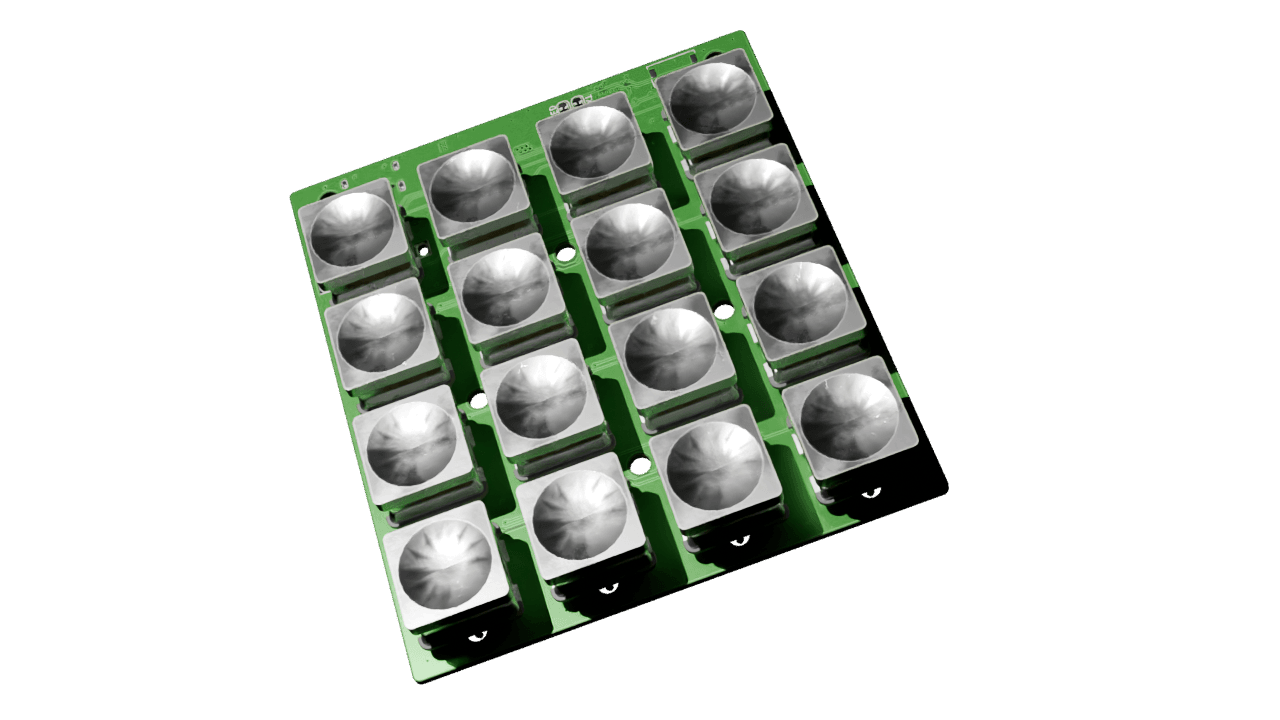
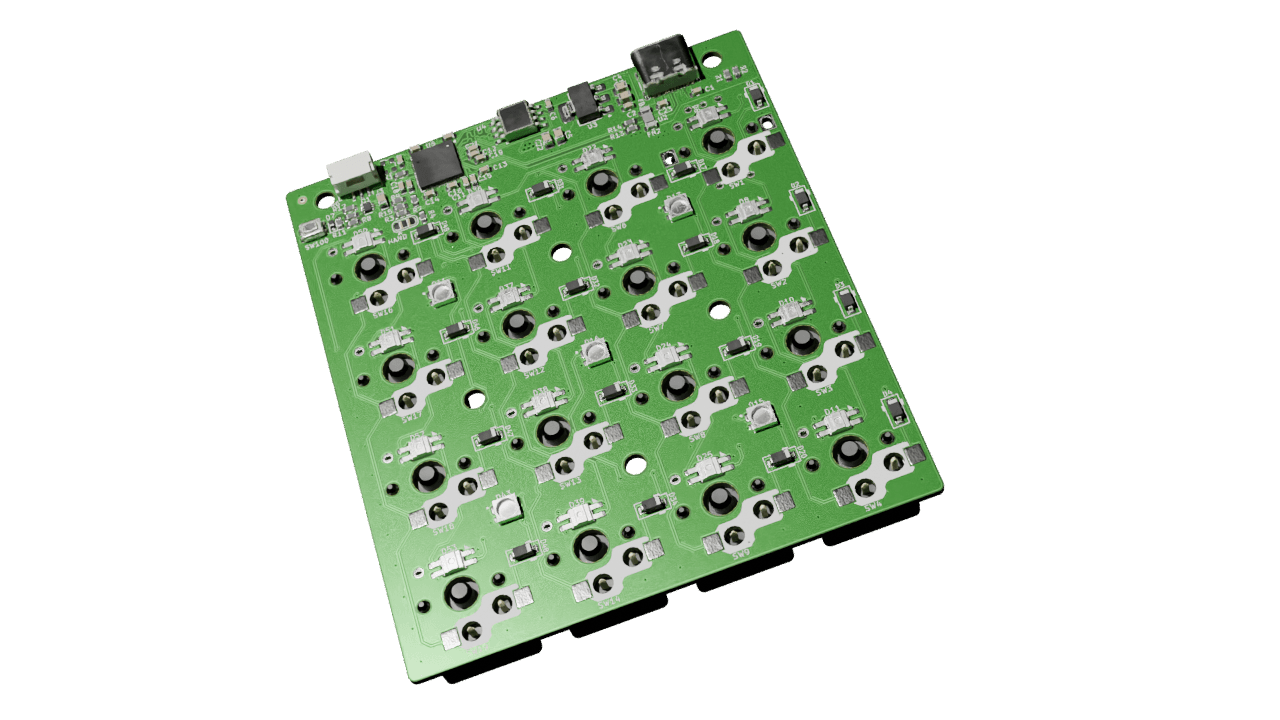
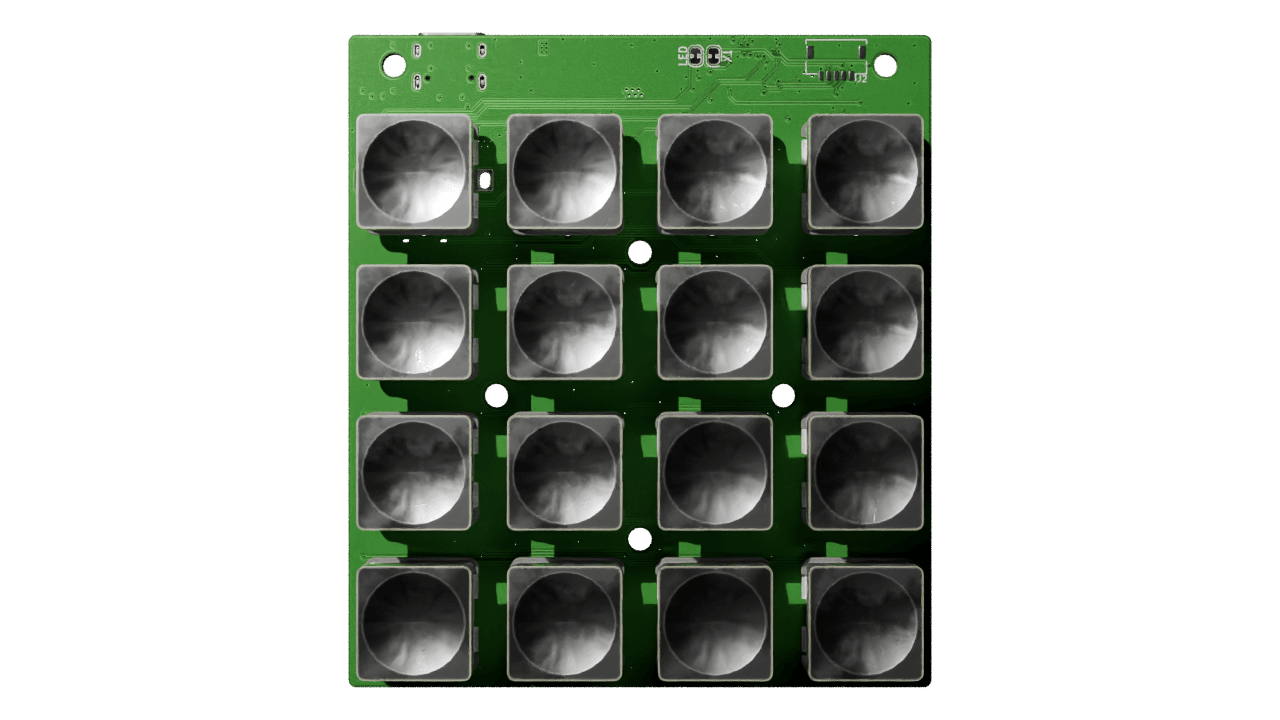
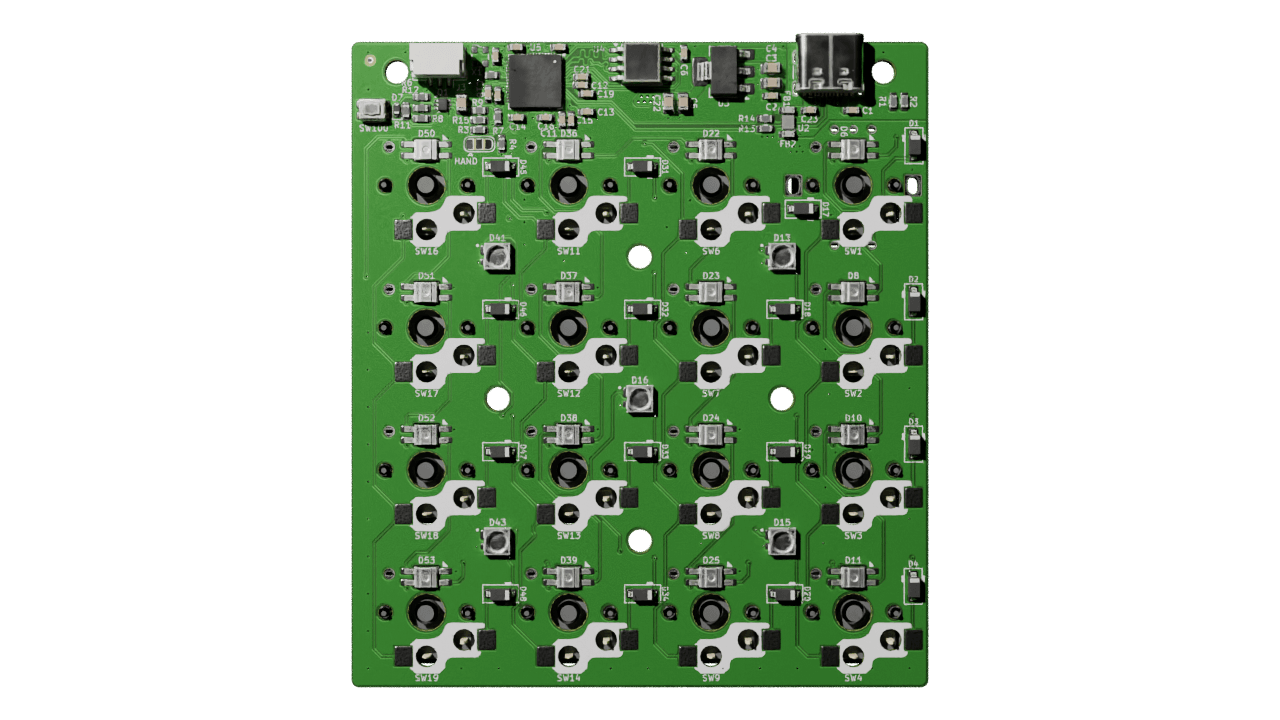
<p><a href="https://github.com/Cimos/Mad_RP2040">Mad_RP2040</a> started in August 2024 as a 2-key test board for the RP2040, before I committed to it on a full split keyboard. It’s now a 4×4 backlit “anything keypad” with USB-C, per-key SK6812MINI-E LEDs, a TRS connector, and a KiBot CI pipeline that spits out gerbers, BOMs, position files, 3D renders, panel data and visual diffs on every push.</p>

<p>This is what each rev was and what went wrong building them.</p>

<h2 id="why-a-test-board">Why a test board</h2>

<p>I want to design my own split keyboard from scratch. A Corne-class board has a lot going on at once: matrix, diodes, controller, USB, per-key RGB, OLED, TRS interconnect, possibly battery management. Get the controller wrong and you can’t trust anything else on the board.</p>

<p>Easier to prove the controller block on its own first. Small board, get the RP2040 reference design and USB-C right, prove bootloader and toolchain, then copy that block into the bigger board.</p>

<p>That’s Rev A.</p>

<h2 id="rev-a-2-key-test-board">Rev A: 2-key test board</h2>

<p>Rev A is small. The whole BOM:</p>

<ul>
  <li><strong>RP2040</strong> with the reference circuit from the <a href="https://datasheets.raspberrypi.com/rp2040/hardware-design-with-rp2040.pdf">Hardware Design with RP2040</a> guide — 1.1V core LDO, 3.3V LDO, QSPI flash, crystal and load caps, boot select button.</li>
  <li><strong>USB-C</strong> with both CC pins pulled down through 5.1k.</li>
  <li><strong>2 × MX hot-swap sockets</strong>, each with a 1N4148W diode.</li>
  <li>Power LED, reset button, four mounting holes.</li>
</ul>

<p>No backlight, no TRS, no battery. Just enough to validate the parts I wanted to copy forward.</p>

<p>Archived as a zip in <a href="https://github.com/Cimos/Mad_RP2040/tree/main/resources/rev_a"><code class="language-plaintext highlighter-rouge">resources/rev_a/</code></a> along with the step models, if you want the minimal RP2040 ref design without the keypad on top.</p>

<h2 id="rev-b-44-anything-keypad">Rev B: 4×4 anything keypad</h2>

<p>Once Rev A worked I started on Rev B. First pass was 4×5; once I tried to actually place 20 keys plus 20 LEDs and their decoupling caps it shrank to 4×4.</p>

<p>What Rev B added on top of Rev A:</p>

<ul>
  <li><strong>16 keys in a 4×4 hot-swap grid.</strong> Generic macropad layout — bind it to whatever you want in QMK.</li>
  <li><strong>Per-key SK6812MINI-E LEDs</strong>, daisy-chained on a single PIO line. The -E variant has the LEDs aimed up through the switch hole, which is what north-facing switches need for shine-through caps.</li>
  <li><strong>TRS connector</strong> on a header strip along the top edge, so the board can run standalone or as one half of a future split.</li>
  <li><strong>Migrated all passives to 0603.</strong> Rev A was a mix of 0603 / 0805. JLC assembly charges least for 0603, so everything went 0603.</li>
  <li><strong>Supplier metadata in the BOM.</strong> Every passive has LCSC, Digikey and Mouser part numbers, sorted by reference designator descending.</li>
  <li><strong>1×2 panelisation</strong> with KiKit tabs, rendered alongside the single-board build.</li>
</ul>

<p>Smaller fixes along the way: hidden text on fab layers, 3.3V LDO swapped from adjustable to fixed, USB diff pair impedance recalculated and rerouted, diode footprints redrawn to silk the cathode, min track spacing tightened in the DRU.</p>

<h2 id="kibot--github-actions-pipeline">KiBot + GitHub Actions pipeline</h2>

<p>The most reusable thing to come out of this project is the CI. Every push to <code class="language-plaintext highlighter-rouge">main</code> runs five GitHub Actions jobs against the KiCad project:</p>

<table style="width: 100%; table-layout: fixed;">
  <colgroup>
    <col style="width: 30%;" />
    <col style="width: 70%;" />
  </colgroup>
  <thead>
    <tr style="background-color: #2c3e50; color: white;">
      <th>Job</th>
      <th>What it produces</th>
    </tr>
  </thead>
  <tbody>
    <tr>
      <td><strong>Build PCB Datapack</strong></td>
      <td>Gerbers (JLC / PCBWay / Elecrow / FusionPCB / P-Ban variants), drill files, position files, schematic PDF, BOM (HTML + CSV + iBOM + KiCost), stencil DXF/STL/SCAD, design report.</td>
    </tr>
    <tr>
      <td><strong>Build Panel Datapack</strong></td>
      <td>Panelised KiCad project, panelised gerbers per fab, panel drawing PDF, panel render PNG.</td>
    </tr>
    <tr>
      <td><strong>Build 2D Images</strong></td>
      <td>Blender renders of the assembled board: top, top-straight, bottom, bottom-straight.</td>
    </tr>
    <tr>
      <td><strong>Build 3D CAD Model</strong></td>
      <td>Full + simplified STEP files for mechanical CAD.</td>
    </tr>
    <tr>
      <td><strong>Build PCB Diff</strong></td>
      <td>Visual rev-over-rev diff against the previous merged version, so PR reviewers can see what moved.</td>
    </tr>
  </tbody>
</table>

<p>It runs on GitHub-hosted runners, driven by <a href="https://github.com/INTI-CMNB/KiBot">KiBot</a> and a shared <code class="language-plaintext highlighter-rouge">kibot-config</code> repo via submodule. About two minutes wall time per push, artifacts on the run page.</p>

<p>Same idea as software CI: when fab needs files, I don’t want to be opening KiCad and exporting ten things by hand.</p>

<h2 id="building-the-boards">Building the boards</h2>

<p>Both revs got fabbed and assembled. Both had a bug.</p>

<p><strong>Rev A</strong> had D+ and D- swapped at the USB-C connector — host reported “USB device not recognized”. Two scalpel cuts, two bodge wires, enumerated fine. The schematic correction went into Rev B before Rev B was sent to fab.</p>

<p><strong>Rev B</strong> came back in November 2025. The controller side came up clean — USB enumerated, bootloader behaved, SK6812MINI-E chain lit on the first WS2812-style driver. The matrix didn’t. First row and first column scanned, nothing past them did. Wiring error in the matrix beyond row/col 1. Both assembled boards had the bug because both came off the same gerbers; both got the same cut-and-bodge.</p>

<p>The matrix fix is not in <code class="language-plaintext highlighter-rouge">main</code> yet. The two boards work bodged and respinning gerbers to fix units I already own hasn’t been worth the time. Fab from <code class="language-plaintext highlighter-rouge">main</code> today and you’ll need the same mod.</p>

<p>Rev A still did what it was supposed to. The D+/D- swap was exactly the kind of bug worth catching on a small cheap board before it shipped into a 16-key one. The Rev B bug was in the matrix, which is new to Rev B and never got a test pass, so de-risking the controller didn’t help with it.</p>

<h2 id="whats-next">What’s next</h2>

<p>Mad_RP2040 is done. The CI is reusable, and the controller block is now a known-good copy-paste in the <a href="https://github.com/Cimos/mad_lib"><code class="language-plaintext highlighter-rouge">mad_lib</code></a> submodule, ready for the full split.</p>

<p>If you want to fab one: clone the repo, grab the latest green CI run, and the JLCPCB folder in the PCB datapack has what JLC needs. MIT-licensed. Note the matrix bug above.</p>

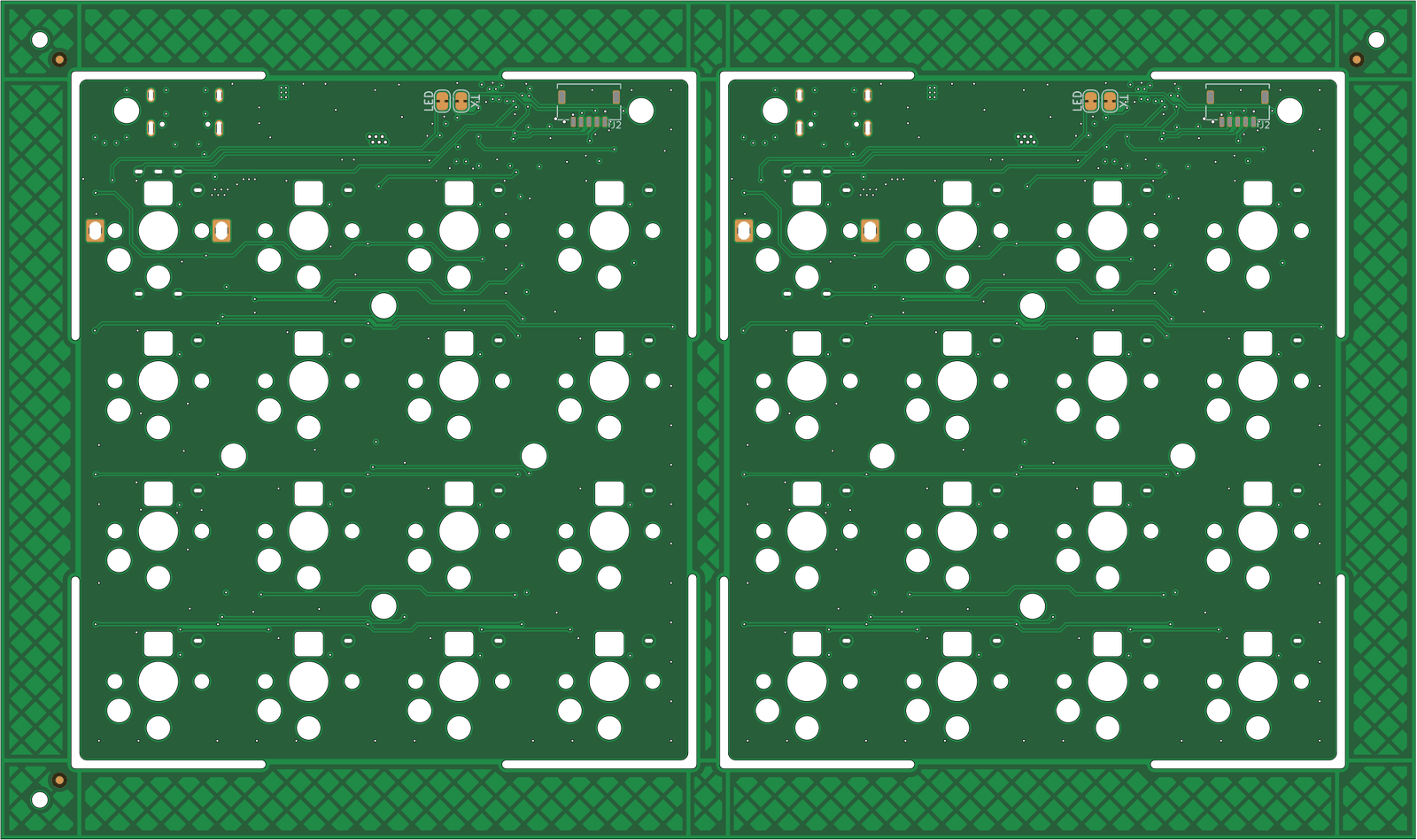
<h2 id="renders">Renders</h2>

<p>From the CI on the most recent push to <code class="language-plaintext highlighter-rouge">main</code>.</p>

<div style="display: grid; grid-template-columns: 1fr 1fr; gap: 1.5rem; margin: 3rem 0;">
  <img src="../images/madrp2040/Mad_RP2040-3D_blender_top.png" alt="MadRP2040 top, 3/4 view, with keycaps" style="width: 100%; height: auto; border-radius: 12px; box-shadow: 0 6px 20px rgba(0,0,0,0.15);" />
  <img src="../images/madrp2040/Mad_RP2040-3D_blender_bottom.png" alt="MadRP2040 bottom, 3/4 view, showing SK6812MINI-E LEDs and routing" style="width: 100%; height: auto; border-radius: 12px; box-shadow: 0 6px 20px rgba(0,0,0,0.15);" />
  <img src="../images/madrp2040/Mad_RP2040-3D_blender_top_straight.png" alt="MadRP2040 top, straight-on" style="width: 100%; height: auto; border-radius: 12px; box-shadow: 0 6px 20px rgba(0,0,0,0.15);" />
  <img src="../images/madrp2040/Mad_RP2040-3D_blender_bottom_straight.png" alt="MadRP2040 bottom, straight-on" style="width: 100%; height: auto; border-radius: 12px; box-shadow: 0 6px 20px rgba(0,0,0,0.15);" />
  <img src="../images/madrp2040/Mad_RP2040-panel.png" alt="MadRP2040 1x2 panelised PCB ready for fab" style="width: 100%; max-width: 80%; height: auto; border-radius: 12px; box-shadow: 0 6px 20px rgba(0,0,0,0.15); grid-column: 1 / -1; justify-self: center;" />
</div>

<p>-SM</p>]]></content><author><name>Simon Maddison</name></author><category term="rp2040" /><category term="kicad" /><category term="kibot" /><category term="github-actions" /><category term="mechanical-keyboard" /><category term="pcb" /><category term="sk6812mini" /><category term="panelization" /><summary type="html"><![CDATA[Table of contents Overview Why a test board Rev A: 2-key test board Rev B: 4×4 anything keypad KiBot + GitHub Actions pipeline Building the boards What’s next Renders]]></summary><media:thumbnail xmlns:media="http://search.yahoo.com/mrss/" url="https://cimos.github.io/assets/images/og/madrp2040-anything-keypad.png" /><media:content medium="image" url="https://cimos.github.io/assets/images/og/madrp2040-anything-keypad.png" xmlns:media="http://search.yahoo.com/mrss/" /></entry><entry><title type="html">A Tiny VS Code Extension for KiCad Custom Design Rules</title><link href="https://cimos.github.io/vscode-kicad-dru-extension" rel="alternate" type="text/html" title="A Tiny VS Code Extension for KiCad Custom Design Rules" /><published>2026-05-10T00:00:00+00:00</published><updated>2026-05-10T00:00:00+00:00</updated><id>https://cimos.github.io/vscode-kicad-dru-extension</id><content type="html" xml:base="https://cimos.github.io/vscode-kicad-dru-extension"><![CDATA[<h2 id="table-of-contents">Table of contents</h2>
<ul>
  <li><a href="#overview">Overview</a></li>
  <li><a href="#why-this-exists">Why this exists</a></li>
  <li><a href="#what-it-does">What it does</a></li>
  <li><a href="#what-it-doesnt-do">What it doesn’t do</a></li>
  <li><a href="#install">Install</a></li>
  <li><a href="#pairing-it-with-kicad">Pairing it with KiCad</a></li>
  <li><a href="#whats-next">What’s next</a></li>
</ul>

<h2 id="overview">Overview</h2>

<p>Just shipped a small Visual Studio Code extension: <strong><a href="https://marketplace.visualstudio.com/items?itemName=cimos.kicad-dru">KiCad Custom Design Rules</a></strong>. Source on GitHub at <a href="https://github.com/Cimos/vscode-kicad-dru">Cimos/vscode-kicad-dru</a>. It adds proper syntax highlighting and snippets for <code class="language-plaintext highlighter-rouge">.kicad_dru</code> files in VS Code, and nothing else. Specifically nothing else — more on that below.</p>

<p>Marketplace ID: <code class="language-plaintext highlighter-rouge">cimos.kicad-dru</code>. MIT-licensed. Currently v0.0.1.</p>

<h2 id="why-this-exists">Why this exists</h2>

<p>KiCad’s only built-in editor for custom design rules is the single-line textbox in <em>Board Setup → Custom Rules</em>, plus a <em>Check Rule Syntax</em> button. That’s fine for a one-liner. The moment your DRU file has more than two or three rules — multi-class clearance, manufacturer-specific via stacks, a stack of <code class="language-plaintext highlighter-rouge">disallow</code> constraints — you want a real editor. Multi-cursor. Search. Folding. Colour that distinguishes a <code class="language-plaintext highlighter-rouge">condition</code> operator from an <code class="language-plaintext highlighter-rouge">A.NetClass</code> accessor from a layer name from a string literal.</p>

<p>The KiCad forums make the demand obvious. There’s a long-running megathread where people post DRU snippets and ask grammar questions, and at least one user spelled it out plainly: <em>“externally I have a better text editor with syntax highlight and the possibility to search things and multiple cursors.”</em> They were clearly already editing in VS Code; the editor just wasn’t doing anything useful.</p>

<p>The closest existing extension is <code class="language-plaintext highlighter-rouge">DanielMeza.kicad-syntax-highlighter</code>. It declares <code class="language-plaintext highlighter-rouge">.kicad_dru</code> in its file-extension list, but the underlying grammar is a generic KiCad s-expression highlighter — keywords like <code class="language-plaintext highlighter-rouge">condition</code>, <code class="language-plaintext highlighter-rouge">constraint</code>, <code class="language-plaintext highlighter-rouge">disallow</code>, <code class="language-plaintext highlighter-rouge">A.NetClass</code>, <code class="language-plaintext highlighter-rouge">intersectsArea</code> all colour as plain atoms. Functionally you get matched parens and not much else. <code class="language-plaintext highlighter-rouge">oaslananka.kicadstudio</code> is the heavyweight all-in-one, and it does great workspace-level things, but it doesn’t ship a TextMate grammar that knows the DRU sub-language either.</p>

<p>Nobody had bothered to write a grammar tuned to DRU specifically. So I did.</p>

<h2 id="what-it-does">What it does</h2>

<ul>
  <li><strong>Syntax highlighting</strong> scoped to <code class="language-plaintext highlighter-rouge">.kicad_dru</code>. Top-level keywords (<code class="language-plaintext highlighter-rouge">version</code>, <code class="language-plaintext highlighter-rouge">rule</code>, <code class="language-plaintext highlighter-rouge">constraint</code>, <code class="language-plaintext highlighter-rouge">condition</code>, <code class="language-plaintext highlighter-rouge">layer</code>, <code class="language-plaintext highlighter-rouge">severity</code>, <code class="language-plaintext highlighter-rouge">disallow</code>), every constraint type (<code class="language-plaintext highlighter-rouge">clearance</code>, <code class="language-plaintext highlighter-rouge">hole_clearance</code>, <code class="language-plaintext highlighter-rouge">track_width</code>, <code class="language-plaintext highlighter-rouge">length</code>, <code class="language-plaintext highlighter-rouge">assertion</code>, …), the token-expression accessors used inside <code class="language-plaintext highlighter-rouge">condition</code> strings (<code class="language-plaintext highlighter-rouge">A.NetClass</code>, <code class="language-plaintext highlighter-rouge">B.intersectsArea</code>, …), operators, severities, layer names, comments, and numbers with units all colour distinctly.</li>
  <li><strong>Snippets</strong> for the rule shapes you keep re-typing: starter <code class="language-plaintext highlighter-rouge">rule</code> block, clearance by netclass, disallow, length matching, via and track sizing, hole-to-hole, assertion. Type the prefix in a paren context, hit tab.</li>
  <li><strong>Editor niceties</strong>: <code class="language-plaintext highlighter-rouge">#</code> line comments toggle with Ctrl+/, parens match, top-level <code class="language-plaintext highlighter-rouge">(rule …)</code> blocks fold, brackets auto-close.</li>
</ul>

<p>That’s the entire v0.0.1 surface. No <code class="language-plaintext highlighter-rouge">extension.js</code>, no activation event, no LSP, no telemetry. Just static JSON contributions: a TextMate grammar, a snippet file, and a language config. It loads when you open a <code class="language-plaintext highlighter-rouge">.kicad_dru</code> and does nothing the rest of the time.</p>

<h2 id="what-it-doesnt-do">What it doesn’t do</h2>

<p>Worth being explicit, because the existing KiCad extensions on the marketplace tend to over-promise:</p>

<ul>
  <li><strong>No validation.</strong> This is a highlighter, not a parser. KiCad’s <em>Check Rule Syntax</em> button remains the source of truth for whether a rule is valid. If your file colours nicely but KiCad rejects it, KiCad is right.</li>
  <li><strong>No schematic / PCB / symbol / footprint support.</strong> Those have their own grammar and their own existing extensions. Staying out of that territory is the whole point — DRU support there is incidental; here it’s first-class.</li>
  <li><strong>No hover docs, completion, or diagnostics yet.</strong> All worth doing once the grammar settles. For v0.0.1 they would have meant shipping a real <code class="language-plaintext highlighter-rouge">extension.js</code> for what is currently three static JSON files. Tracked as future work.</li>
</ul>

<h2 id="install">Install</h2>

<p>From the VS Code Marketplace:</p>

<div class="language-plaintext highlighter-rouge"><div class="highlight"><pre class="highlight"><code>ext install cimos.kicad-dru
</code></pre></div></div>

<p>…or search for <strong>“KiCad Custom Design Rules”</strong> in the Extensions view.</p>

<p>A <code class="language-plaintext highlighter-rouge">.vsix</code> is also attached to each GitHub release if you’d rather sideload:</p>

<div class="language-plaintext highlighter-rouge"><div class="highlight"><pre class="highlight"><code>code --install-extension vscode-kicad-dru-&lt;version&gt;.vsix
</code></pre></div></div>

<h2 id="pairing-it-with-kicad">Pairing it with KiCad</h2>

<p>KiCad ≥ 7 has <em>Preferences → Configure Paths → External Tools</em>. Point it at VS Code’s executable and you get one-click round trips: open the <code class="language-plaintext highlighter-rouge">.kicad_dru</code> file from the PCB editor, edit it here, save, switch back, re-run <em>Check Rule Syntax</em>. That’s the workflow this extension is built around.</p>

<h2 id="whats-next">What’s next</h2>

<p>The big-ticket items for v0.1.x:</p>

<ul>
  <li><strong>Hover docs</strong> scraped from the KiCad documentation, so hovering on <code class="language-plaintext highlighter-rouge">clearance</code> or <code class="language-plaintext highlighter-rouge">intersectsArea</code> surfaces the constraint type’s docs without leaving the editor.</li>
  <li><strong>Layer-name catalogue refresh</strong> — KiCad 9 added user-defined Cu layers and renamed some display strings, and the v0.0.1 grammar isn’t fully aware of them yet.</li>
  <li><strong>Open VSX publish</strong> so VSCodium / Cursor / Theia users can install without bouncing through the MS marketplace.</li>
</ul>

<p>If you hit a real <code class="language-plaintext highlighter-rouge">.kicad_dru</code> file the highlighter mangles, <a href="https://github.com/Cimos/vscode-kicad-dru/issues">open an issue</a> with a minimal snippet and I’ll take a look. PRs welcome too — DRU corner cases are exactly the kind of thing a small fixture catches and prose review misses.</p>

<p>-SM</p>]]></content><author><name>Simon Maddison</name></author><category term="kicad" /><category term="vscode" /><category term="kicad-dru" /><category term="design-rules" /><category term="pcb" /><category term="eda" /><category term="extension" /><summary type="html"><![CDATA[Table of contents Overview Why this exists What it does What it doesn’t do Install Pairing it with KiCad What’s next]]></summary><media:thumbnail xmlns:media="http://search.yahoo.com/mrss/" url="https://cimos.github.io/assets/images/og/vscode-kicad-dru-extension.png" /><media:content medium="image" url="https://cimos.github.io/assets/images/og/vscode-kicad-dru-extension.png" xmlns:media="http://search.yahoo.com/mrss/" /></entry></feed>